
BURNING BRIDGES · PHOTO-TO-DANCE GUIDE
How to Make a Toc Toc AI Dance Video from a Photo
To make a Toc Toc AI dance video from a photo, choose the exact dance reference, prepare a clear image of one person, and use a tool that accepts a motion-reference video. Review the movement and face before exporting, then add suitable audio.
By Burning Bridges AI Video · Published
Choose the Toc Toc dance template you mean
Start with the clip, not the name. If you want the living-room knee lift and bounce shown in our examples, keep that reference visible while choosing a workflow. A different clip carrying the same trend label may use different gestures, staging or camera movement.
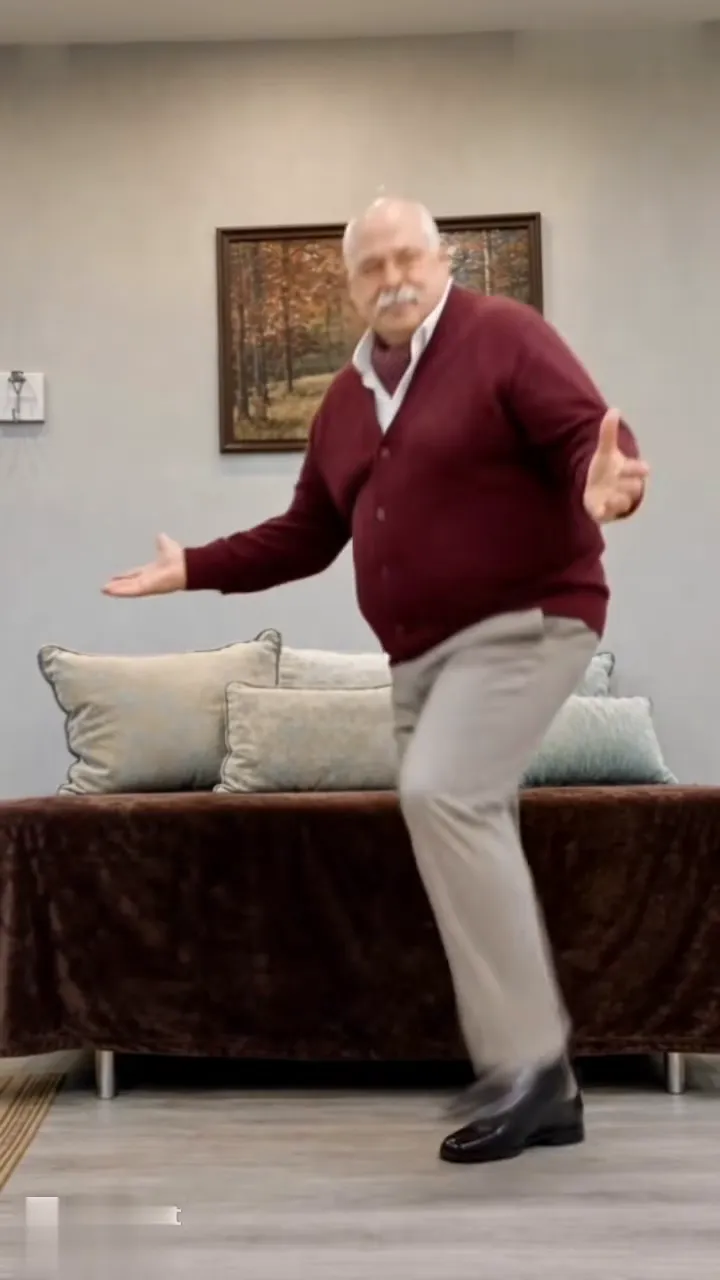
Decide what must match: the order of the moves, the room, the outfit, or all three. A prompt-driven dance concept and a reference-guided recreation are different tasks. Media.io's official Toc Toc guide describes using a character image with a dance clip to guide choreography; a text description alone may produce another sequence.
What you need for a photo-to-dance video
- One clear photo: start with a single person, a readable face and even lighting. Include the full body when the outfit and shoes matter.
- A usable motion reference: select a clip you own or have permission to transform. A public preview is not permission to download or reuse it.
- A compatible workflow: check that the selected mode accepts both an image and a video reference. An image-only animator has no video input to follow.
- A plan for audio: decide whether the output will be silent or whether you will add audio you may use in your editor or publishing app.
Check the chosen service's current input limits, output options and total cost before submitting. File-size, duration and frame requirements differ between tools. Our local photo preview accepts JPG, PNG and WebP files up to 8 MB; those limits do not describe an external provider.
How to make a Toc Toc AI dance video: five steps
-
Match your idea to a reference
Watch the entire routine, including its opening and last pose. Note the leg that lifts, the arm position and any turn. If there are cuts or overlapping dancers, choose a clearer section before spending credits. Use our Toc Toc dance video maker references to compare the two living-room takes.
-
Prepare your portrait
Crop out other people and leave room around the head, hands and feet. Pick a photo with an outfit you can describe without guessing hidden details. You can inspect it in the local portrait preview ; this only displays your selection in the tab. See the photo preparation guide for framing examples.
-
Add the image and motion clip in your chosen tool
Open a mode that explicitly supports a character image plus a motion reference. Put each file in its intended input: the portrait describes the person, while the clip supplies the movement. If the interface has no reference-video input, switch modes or treat the result as an inspired dance rather than a recreation of the exact routine.
-
Generate a short first version and inspect it
Use the shortest useful section supported by the service. Watch it once at normal speed and again around the fastest move. Compare the face before and after a turn, check whether the raised leg lands naturally, and look for cropped hands. Change one input at a time so you can tell what affected the result.
-
Add audio and export for the destination
Check the source sound before adding another track. Avoid playing two copies at once. Export in the framing your publishing channel needs and watch the saved file, rather than relying only on the editor preview. A vertical source is useful for a vertical post when the chosen tool supports that output; check the export instead of assuming every workflow preserves it.
A Toc Toc AI dance prompt to adapt
Use this original example only where a tool accepts both an appearance image and a motion reference. It is a starting point, not a tested preset or a guarantee of an identical result. Replace any instruction that conflicts with the selected tool's controls.
Create a full-body clip of the single person in the supplied photo, using the accompanying dance video to guide the sequence and timing. Keep the face, hair and outfit recognizable. Leave space around the arms and shoes throughout the knee lifts and bounces. Use one steady shot and one dancer. Avoid adding new steps, extra people or scene cuts. Keep the chosen background consistent.
Keep identity, movement and camera instructions separate. Adding unrelated spins or another location makes it harder to judge whether the reference was followed. Dreamina's official dance guide also recommends simple action beats, stable framing and a review of hands, feet and continuity. Its prompt-based examples should not be mistaken for a guarantee that a particular source routine will be reproduced.
When the dance, face or audio looks wrong
- The output is a different dance
- Confirm that the workflow actually received the reference video. Remove contradictory movements from the prompt, then try a clearer segment.
- The face or outfit changes
- Try a sharper portrait with fewer obstructions. Compare the first and last frames, and inspect turns before accepting the clip.
- Hands deform or feet slide
- Check for hidden limbs and tight cropping in both inputs. Simplify the scene and use a section with more readable movement.
- The video is silent or the beat sounds doubled
- Inspect the exported file and its audio track. If you add music separately, mute the unwanted track and replay the saved result.
A better prompt cannot recover a missing input or a face that is not visible. Fix the material first; use the general troubleshooting guide for more review checks.
Toc Toc dance video FAQ
Can I make a Toc Toc dance video from one photo?
One photo can supply the dancer's appearance. To follow a particular routine, choose a workflow that also accepts a dance reference video. Our example page previews your photo locally; it does not generate a Toc Toc clip.
Can I use a Toc Toc AI prompt without a reference video?
You can describe a dance to a text-driven model, but the movement may differ from the routine you watched. Use a motion-reference workflow when matching the sequence matters.
Is a Toc Toc dance maker free?
Watching the examples and previewing a photo on this site are free. External generation and export costs depend on the chosen service. Check credits, watermarks and export charges before submitting.
Can a CapCut template make my photo perform the dance?
Check what the specific template does. An editing template can arrange existing media; it does not necessarily animate a still photo through a dance. Look for an explicit image-animation or motion-reference workflow rather than relying on the template name.
Is this a tutorial for learning the physical dance?
No. This guide covers making an AI video from a photo. If you want to film yourself dancing, use a movement tutorial and practice the routine shown in your chosen reference.
Does buying Burning Bridges credits generate this template?
No. The current plans cover the Burning Bridges party template. Buying credits does not select or generate the Toc Toc routine shown in these references.
Choose the routine before choosing the tool
A useful first attempt starts with one visible dancer, a clear portrait and the exact movement you want. Confirm the reference input, inspect the full output, and handle audio separately when needed. That gives you a concrete result to evaluate instead of judging a tool by a trend label.
Watch the Toc Toc dance examples or browse more video ideas . To compare the site's current party-video plans, visit Pricing .
Sources and scope
This guide combines our current reference-page behavior with the official workflow descriptions linked above, checked on October 16, 2026. It does not report an end-to-end Toc Toc generation test on Burning Bridges, measured success rates or a verified free-generation offer.