
OZIL GOAL · HOW TO
How to Make an Ozil Goal AI Video
Plan an Ozil Goal AI video around the chip, pause and finish. Prepare a player portrait, describe the ball and camera path, and inspect each touch.
By Burning Bridges AI Video · Updated
1. Choose the result and workflow
Start here: Break the idea into short action tests. Start with a controlled touch before attempting the keeper, defenders and finish in one render. A permitted motion reference may help with timing, but check the actual input support rather than assuming a football keyword supplies the whole play.
Explore what the Ozil Goal AI trend is, Ozil Goal page, then choose clear photos for your video.
2. Prepare the photo inputs
Use one standing person with the full outfit and shoes visible. Choose a clear face without a ball, hand or accessory covering it. For a custom pitch scene, leave room around the feet so the ball can be placed without obscuring the legs.
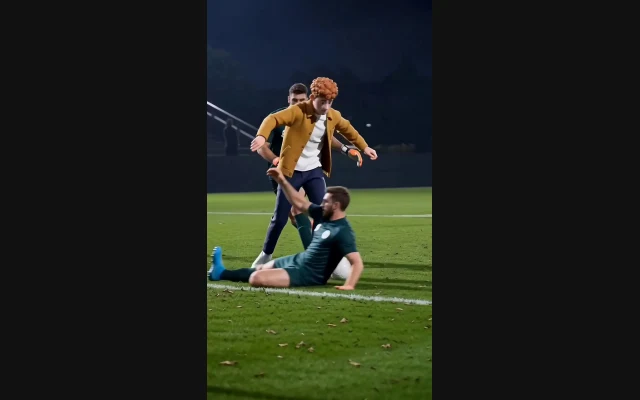
Open the local photo preparation area to inspect the selected files. Follow the format and size rules printed beside its inputs. Then check the requirements of your chosen creation tool separately; they may differ.
3. Plan a short sequence
The flick
Make the player’s touch and the ball’s path visible together. The keeper should not hide the foot at the key moment.
The pause
Let the defenders commit while the lead remains readable. Screen direction and the location of the goal should stay consistent.
The finish
Show the final contact and where the ball goes. A cut that skips the ball entirely can hide whether the sequence makes sense.
Use these as separate composition checks. A service with multi-shot controls may accept them together; otherwise, test a short shot first and join usable clips in an editor. Do not assume a single upload supports every camera change.
4. Adapt an original starting prompt
For a compatible image-to-video tool, this is a starting idea rather than a tested preset or a guarantee of the reference choreography. Keep only the actions your selected model can handle.
One adult footballer on a clear pitch, full body and ball visible. The player makes one gentle controlled touch, pauses with the ball close, then settles into a balanced stance. Preserve face, kit and leg proportions; keep one ball visible with a continuous path and both feet anatomically consistent. Stable sideline camera.
Choose the appearance references through the tool’s supported input controls. A written instruction to preserve a face cannot replace a missing identity input. Adjust the framing to your intended output before spending credits on longer clips.
5. Review the first draft
- The ball duplicates or disappears
- Reduce the scene to one touch and remove extra players from the first test. Inspect every contact rather than only the opening and final frame.
- The feet cross unnaturally
- Choose a simpler starting stance with both shoes visible. Avoid demanding a full sprint, flick and finish at once.
- The goal changes position
- Keep camera movement modest and use a starting image with clear pitch geometry. A changing background makes the action impossible to follow.
6. Edit, check sound and export
Trim the start and ending so the sequence has a clear setup and a settled finish. Avoid using an elaborate transition to hide a face or hand error: compare a simpler shot first. If several clips are joined, check screen direction and identity on both sides of every cut.
Use audio you are entitled to use and inspect the actual export. Check whether the tool includes audio, allows downloads and adds a watermark before rendering. The Ozil Goal free-method guide gives an editing alternative when you prefer to avoid paid AI tests.
Film controlled touches if the movement is within your ability. For synthetic action, test ball continuity before investing in a complicated multi-player render. Treat the face, feet and ball as separate checks.
Reference and method notes
Reviewed October 22, 2026. Visual observations describe the references collected on our Ozil Goal page, rather than every version posted elsewhere. This guide does not claim an original upload date, a popularity ranking or a tested external render. The prompt above is original planning guidance; no external generation was run for this article.
Frequently asked questions
Why can a football AI clip look wrong even when the face is good?
Ball continuity, foot contact and player positions must agree across frames. A stable face alone does not make the play physically coherent.
Does the reference audio come with every result?
No such promise is made here. Check the selected tool’s audio and export terms, and use audio permitted for your intended post.