
BURNING BRIDGES · DANCE VIDEO GUIDE
How to Make a Tiptoeing in My Jordans Meme Video
To make a Rumpelstiltskin tiptoeing in my Jordans video, choose a clear portrait, prepare the costumed barn scene and keep the facial gesture separate from the full-body dance. Then edit the usable shots to your chosen audio. This tutorial focuses on making the movement readable, not just matching a thumbnail.
By Burning Bridges AI Video · Updated
1. Choose how to make your tiptoe meme
Choose the result first: a photo-led character video, a custom animated scene or an edit of footage you can use. For a no-render approach, film the gestures yourself or compare the free editing options linked below. For AI, decide whether identity, the hush gesture or the footwork is the main requirement.
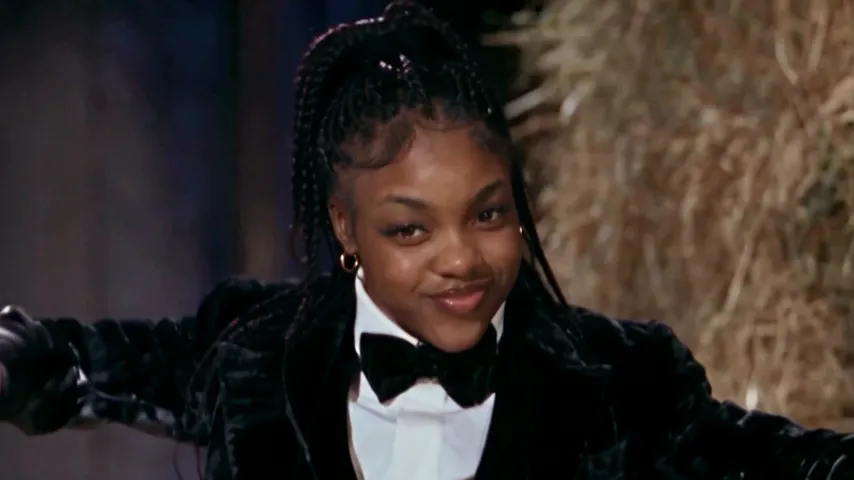
A dedicated portrait template
If you find a service offering this exact scene, inspect its current input requirements, examples and output options. Confirm that the selected template is the barn dance before purchasing. Do not assume a general dance template will reproduce the same sequence.
A custom image-to-video workflow
For more control over the setting, build a starting image and animate it in small pieces. This route lets you revise composition before paying for movement. It also requires more judgment: a convincing still does not guarantee stable hands, facial features or feet during animation.
2. Prepare the portrait and opening frame
Choose one well-lit face with visible eyes and a natural expression. A slightly wider portrait gives you room to crop without cutting through the hair. Avoid beginning with a tiny social-media thumbnail or a face partly hidden by a hand.
- Use a photo you own or have permission to use.
- Inspect glasses, facial hair and the jawline at full size.
- Keep your original photo separate from edited scene images.
- For the local preview on this site, use JPG, PNG or WebP up to 10 MB. External tools have their own limits.
For a custom scene, place the person in a simple barn composition with enough space for the intended motion. If footwork is the focus, include the entire body and floor in the opening image. For a facial gesture, use a closer composition. Trying to fit both into one cramped frame makes the result harder to judge.
Check the still before animating: are the hands already plausible, are both shoes visible, and does the face resemble the source? Correct these first. Motion should not be your first attempt to repair a flawed starting image.
3. Adapt a Rumpelstiltskin tiptoeing in my Jordans prompt
This original prompt is a starting point for a prepared image, not a tested model preset. It focuses on one short moment. Adapt it to your chosen tool and leave out actions that do not fit your opening frame.
Animate the person in the supplied image in a warmly lit wooden barn at night. Keep the same facial features, hair, costume and background. The person takes one small step forward, briefly raises one finger near the lips, lowers the hand and gives a playful smile. Use a steady camera and restrained movement. Keep the eyes visible and the hand separate from the mouth. End on a stable pose.
Make the dance a separate shot
Once the expression works, prepare a full-body frame and try a second clip:
Keep the person and wooden barn consistent with the supplied full-body image. The person makes a playful tiptoe entrance with small alternating steps, a gentle knee lift and relaxed arms, then pauses with a mischievous smile. Keep the face recognizable, both shoes visible and contact with the floor believable. Use a fixed camera and preserve the costume. Avoid large jumps, rapid spins and sliding feet. Finish in a stable standing pose.
For the tiptoeing in my Jordans meme, naming the song in a motion prompt is not a substitute for describing the steps. Give the image-to-video tool a visible action; add or select the audio during the editing stage. This prompt is an original planning draft, not a tested choreography preset.
Separating the shots gives you a clear revision target. If the hand gesture fails, you can replace that clip without discarding a good dance. Join only the useful portions in your editor; you do not need to keep every generated frame.
4. Check the face, hands and footwork
Watch the first draft at normal speed, then pause at the hand gesture and each change of foot position. Compare those frames with the starting image. Change one instruction or image detail at a time so you can tell what helped.
- The face changes during the smile
- Try a smaller expression and less head movement. Check whether the starting face is clear enough before adding stronger motion.
- The finger merges with the mouth
- Shorten the gesture or keep the hand farther from the face. A simpler smile-only shot may work better than repeating the same failed action.
- The feet slide or disappear
- Use a full-body starting image with floor space. Reduce the size of the steps and remove camera movement from the prompt.
- The costume changes between shots
- Reuse a consistent scene image where your tool allows it. Compare the collar, sleeves and shoes before joining the clips.
- The scene looks right but the dance is different
- A generic motion prompt is not a choreography reference. Simplify your goal or choose a workflow that explicitly accepts motion references; check its supported inputs first.
5. Match the tiptoe movement to audio and export
Check the silent edit first, then look for Riff Raff’s Tip Toe Wing In My Jawwdinz in the audio options available to you. Use it only where permitted for your intended post; do not assume an AI render includes that recording. If the track is not available for your use, choose another suitable sound.
- Find the frame where the first clear tiptoe step lands.
- Place that step on a beat, leaving a short pause before the grin or gesture.
- Mute a duplicate track if the clip already contains audio.
- Loop the cut once to check for a clipped foot, sudden jump or abrupt ending.
Keep a wide version if that preserves the full dance. If you also need a vertical edit, check the crop at the widest arm position and every step; fitting the opening face is not enough. Padding may preserve more action than a tight crop.
Export one draft, reopen the file and check the first frame, audio level and ending. Keep the source image and edit so you can correct a small problem without rebuilding the whole sequence.
Rumpelstiltskin AI video FAQ
Can I make a Rumpelstiltskin AI video from one photo?
A compatible portrait template may use one photo. For an image-to-video workflow, prepare a complete starting scene first, then animate that image. Check the selected tool before paying.
Will a prompt reproduce the exact reference dance?
No. A text prompt describes an intention, not an exact choreography. Start with a short action and inspect the result before adding more movement.
Is the prompt tested on a particular model?
No. It is an original planning example. Controls, limits and results vary by tool, so adapt it to the workflow you choose.
How do I plan the Rumpelstiltskin meme from a photo?
Choose a sharp portrait, compose the costumed barn scene and give each shot one action. Start with the hush gesture and smile, then use a wider frame for the dance so both feet stay visible.
How do I make the tiptoeing in my Jordans meme from a photo?
Start with one clear portrait, prepare a full-body barn scene and animate a short tiptoe action. Check the face and shoes before editing the shot to permitted audio. Keep the hush gesture separate if combining it with the dance causes distorted hands.
Will typing the song name generate the exact dance and soundtrack?
A song name does not specify the choreography or guarantee an audio recording. Describe the movement separately, inspect the result and check your audio options before exporting.