
ZOMBIE LOVE STORY · WHAT IS
What Is the Zombie Love Story AI Trend?
Understand Zombie Love Story AI: two partners, a cabin encounter and a reunion in a field memory. Compare roles, recognition and the connecting approach.
By Burning Bridges AI Video · Updated
What is the Zombie Love Story AI video idea?
Short answer: Zombie Love Story AI is a two-person horror-to-memory sequence. One partner is infected in a cabin, recognition changes the encounter, and an approach or leap cuts to a warm embrace in a field. The emotional turn depends on seeing the same two people in both settings.
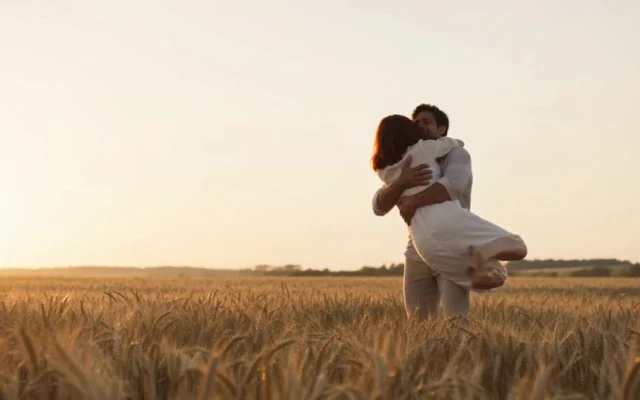
The contrast is built from light, posture and relationship. The cabin is tense; the field is intimate. The cut should carry a movement or gaze across the change so the viewer understands why the warm scene belongs to the cold one.
Read the scene, one moment at a time
Recognize the partner
Show both people with clear eye lines. The survivor’s change of posture provides the turning point, so leave enough room to see the arms.
Connect the movement
Use an approach or short step that can carry into the next scene. It need not be a complicated leap to communicate recognition.
Finish the embrace
Keep the same pair in the field, with coherent arms and shoulders. Let the warmer shot last long enough for the healthy face to be recognized.
What should you distinguish before choosing a tool?
A zombie portrait is a visual effect, while this format asks for a connected story. The person who looks infected must still be identifiable in the healthy memory. Role labels are important: swapping the survivor and partner midway can make the ending confusing.
Compare a full moving example with the result you actually want. A thumbnail can show clothing and background, but it cannot establish timing, identity stability or what happens when people and objects overlap.
Which photos and roles matter?
Use two separate portraits of adults who agreed to appear. Keep both faces well lit and unobstructed. Decide who stays human and who changes before choosing the photos; either person can take either role in the local planner.
You can inspect the photos in the local Zombie Love Story planner. The preview displays the files you choose; it does not predict a model’s output.
How do you turn the idea into a video?
Build the cabin and field compositions with the same role map before animating either. Start with a simple approach and hug. If the external tool does not support two identities or shot continuity, create shorter clips and use an editor to control the transition.
The Zombie Love Story creation guide walks through the inputs and the checks to make before accepting a draft. For a route without paid renders, compare Zombie Love Story free options.
What makes a result worth keeping?
Choose filming when the relationship and emotional turn matter most. Use a two-character AI workflow only after checking its role handling. If the transition fails, simplify the movement before adding more horror detail.
Review the exported file, not just the first frame or a loading preview. Watch once without sound to judge the visual sequence, then with your chosen audio to assess the timing. A reference soundtrack does not establish what another tool includes.
References and scope
Reviewed October 22, 2026. Visual observations describe the references collected on our Zombie Love Story page, rather than every version posted elsewhere. This guide does not claim an original upload date, a popularity ranking or a tested external render.
Frequently asked questions
Does the reference audio come with every result?
No such promise is made here. Check the selected tool’s audio and export terms, and use audio permitted for your intended post.