
BABYDOLL DANCE · WHAT IS
What Is the Babydoll Dance AI Trend?
Explore the Babydoll Dance AI trio: a central lead, two side dancers and a sunny-street two-step. See how spacing and photo roles affect the result.
By Burning Bridges AI Video · Updated
What is the Babydoll Dance AI video idea?
Short answer: The Babydoll Dance reference is a three-person two-step: a central lead and two side dancers in dark formalwear on a sunny street. The AI version changes the cast while keeping that coordinated group composition as the visual idea.
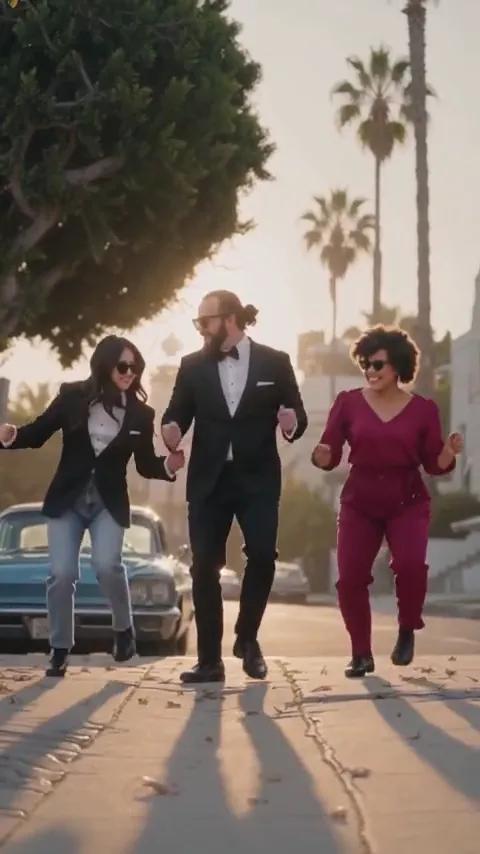
The center dancer gives the eye an anchor, but the side dancers make the scene work. Their spacing, outfit shapes and direction of movement should read together. A technically sharp face can still feel wrong if one person steps the opposite way or blocks another dancer.
Read the scene, one moment at a time
Set the trio
Put the lead in the middle with visible space between all three bodies. Frame the full group rather than cropping the side dancers at the shoulders.
Keep the two-step together
Start with a short side-to-side phrase. The rhythm should be shared without making the three bodies overlap.
Finish as a group
Use a clean ending pose where all three faces can be checked. Do not judge the cast from the center face alone.
What should you distinguish before choosing a tool?
Compare a full moving example with the result you actually want. A thumbnail can show clothing and background, but it cannot establish timing, identity stability or what happens when people and objects overlap.
Which photos and roles matter?
Choose a separate portrait for each person you want to cast. Keep face angles and lighting reasonably similar, and avoid sunglasses when selecting the source photos even if the target styling uses them. Label center, left and right before submitting anywhere.
You can inspect the photos in the local Babydoll Dance planner. The preview displays the files you choose; it does not predict a model’s output.
How do you turn the idea into a video?
Choose a tool with documented multi-person casting if all three identities matter. For a custom scene, first inspect a still of the full trio, then animate a small coordinated step. Trying to correct a wrong left-right assignment after rendering is more work than fixing the initial composition.
The Babydoll Dance creation guide walks through the inputs and the checks to make before accepting a draft. For a route without paid renders, compare Babydoll Dance free options.
What makes a result worth keeping?
Film with friends when the shared step is easy to perform. Use a cast-aware tool only when you need to generate the group from separate portraits. A free single-person trial is not a substitute for a verified three-role workflow.
Review the exported file, not just the first frame or a loading preview. Watch once without sound to judge the visual sequence, then with your chosen audio to assess the timing. A reference soundtrack does not establish what another tool includes.
References and scope
Reviewed October 22, 2026. Visual observations describe the references collected on our Babydoll Dance page, rather than every version posted elsewhere. This guide does not claim an original upload date, a popularity ranking or a tested external render.
Frequently asked questions
Does the reference audio come with every result?
No such promise is made here. Check the selected tool’s audio and export terms, and use audio permitted for your intended post.