
CHEBA MAN · WHAT IS
What Is the Cheba Man AI Trend?
Compare the Cheba Man original and AI red-stage dance references. Learn what the face, full-body gestures and framing contribute to the scene.
By Burning Bridges AI Video · Updated
What is the Cheba Man AI video idea?
Short answer: Cheba Man AI dance references place a new performer into a vivid red-stage dance. The comparison on this site pairs an original performance with an AI version so you can inspect what changes in the face and what stays recognizable in the movement.
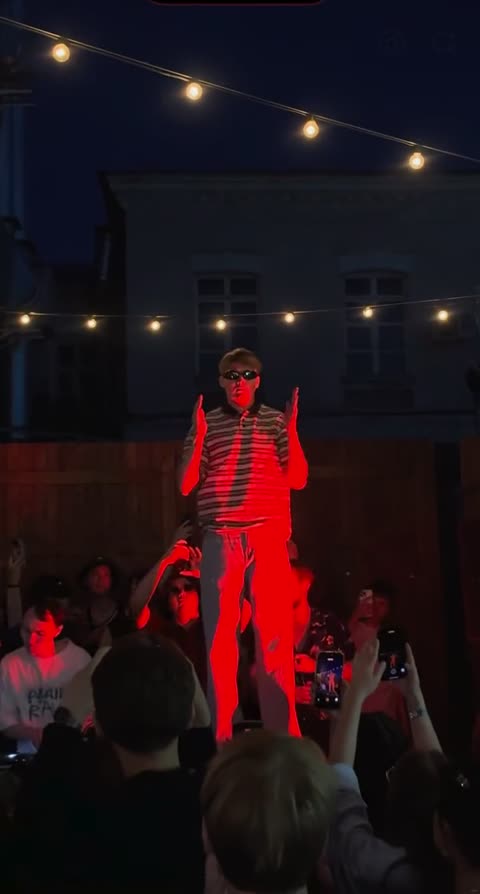
The red lighting and tall frame give this scene a strong silhouette. Watch how the performer occupies the stage before focusing on a single facial detail. A successful visual idea keeps the feet grounded and the outline of the arms readable against the saturated background.
Read the scene, one moment at a time
Read the stage
Establish the lead against the red background. Leave separation around the arms and body rather than filling the frame edge to edge.
Choose one phrase
Pick a short movement that has a beginning and a settled end. Use the full reference to understand the timing, not just its cover image.
Inspect the turn
Check the moment the face moves away from the camera. This is where a replacement or animated portrait can become harder to recognize.
What should you distinguish before choosing a tool?
A red background alone is not the Cheba Man dance. A custom scene can borrow the stage mood, while a motion-led or face-replacement workflow tries to preserve an existing performance. Those methods require different inputs and give you different control over the result.
Compare a full moving example with the result you actually want. A thumbnail can show clothing and background, but it cannot establish timing, identity stability or what happens when people and objects overlap.
Which photos and roles matter?
Use one unobstructed face with even lighting and visible hair. A naturally lit portrait is easier to inspect than an image already tinted red. Include the outfit and shoes if you are building a new full-body dancer rather than using a face-led effect.
You can inspect the photos in the local Cheba Man planner. The preview displays the files you choose; it does not predict a model’s output.
How do you turn the idea into a video?
For a close match to the demonstrated dance, investigate a workflow that explicitly supports a permitted motion reference. For your own interpretation, start with a full-body stage image and animate a small phrase. A general text-to-video field does not establish that exact choreography can be copied.
The Cheba Man creation guide walks through the inputs and the checks to make before accepting a draft. For a route without paid renders, compare Cheba Man free options.
What makes a result worth keeping?
Film if stage color and your own movement are the main goal. Explore a dedicated effect if you need a particular routine, and inspect a complete exported sample before paying. The red thumbnail is not enough to judge face stability or footwork.
Review the exported file, not just the first frame or a loading preview. Watch once without sound to judge the visual sequence, then with your chosen audio to assess the timing. A reference soundtrack does not establish what another tool includes.
References and scope
Reviewed October 22, 2026. Visual observations describe the references collected on our Cheba Man page, rather than every version posted elsewhere. This guide does not claim an original upload date, a popularity ranking or a tested external render.
Frequently asked questions
Can a red-stage prompt reproduce the exact Cheba Man routine?
A text prompt can describe the setting and broad motion, but it does not guarantee the exact steps. A compatible motion-reference workflow may give more control.
Does the reference audio come with every result?
No such promise is made here. Check the selected tool’s audio and export terms, and use audio permitted for your intended post.