
FLYING ENTRANCE · WHAT IS
What Is the Flying Entrance AI Trend?
Explore Flying Entrance AI: a seated person stays in the foreground as a car arrives airborne behind them. Check depth, scale and the two photo inputs.
By Burning Bridges AI Video · Updated
What is the Flying Entrance AI video idea?
Short answer: Flying Entrance is a cinematic car-jump concept: a person remains seated in the foreground while a car arrives airborne behind them. The local page separates the person and car photos because both subjects need a clear identity in the proposed scene.
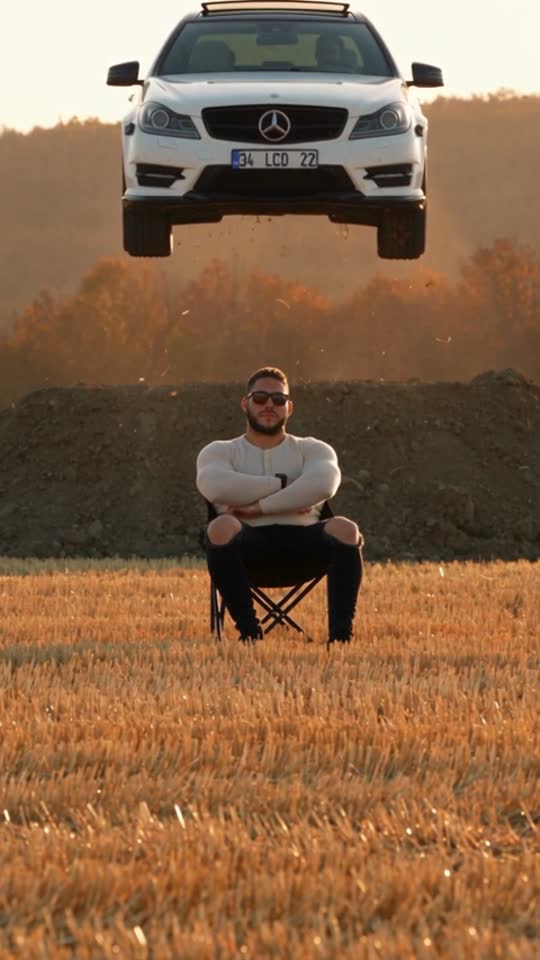
The still person and moving car create the contrast. The car’s size, direction and position behind the chair have to agree, while the foreground subject stays calm. If the vehicle passes through the person or changes scale abruptly, the entrance loses its intended effect.
Read the scene, one moment at a time
Establish the calm foreground
Keep the seated person clearly separated from the background space. The chair and body should look stable before the vehicle appears.
Plan the car path
Choose one direction behind the person and keep the car at a consistent distance. Do not ask for multiple direction changes in the same short shot.
Resolve the entrance
Decide whether the shot ends before a landing or shows a controlled final position. An unexplained disappearance can look like an error rather than an ending.
What should you distinguish before choosing a tool?
Compare a full moving example with the result you actually want. A thumbnail can show clothing and background, but it cannot establish timing, identity stability or what happens when people and objects overlap.
Which photos and roles matter?
Choose a clear person photo with enough body information for the seated composition and a separate image showing the whole car. A front view can communicate the grille and body shape. Avoid cropping the wheels or mixing several cars in one input.
You can inspect the photos in the local Flying Entrance planner. The preview displays the files you choose; it does not predict a model’s output.
How do you turn the idea into a video?
Use a multi-reference or compositing workflow that supports a person and a vehicle. Build a still composition first to test scale and separation. Animate a short background movement before attempting a full airborne arrival; the vehicle should never intersect the foreground subject.
The Flying Entrance creation guide walks through the inputs and the checks to make before accepting a draft. For a route without paid renders, compare Flying Entrance free options.
What makes a result worth keeping?
Use a miniature or storyboard for the cheapest way to test the gag. For a generated version, verify two-reference support and focus on depth and vehicle shape. Real stunt footage is not required to plan the effect.
Review the exported file, not just the first frame or a loading preview. Watch once without sound to judge the visual sequence, then with your chosen audio to assess the timing. A reference soundtrack does not establish what another tool includes.
References and scope
Reviewed October 22, 2026. Visual observations describe the references collected on our Flying Entrance page, rather than every version posted elsewhere. This guide does not claim an original upload date, a popularity ranking or a tested external render.
Frequently asked questions
Does the reference audio come with every result?
No such promise is made here. Check the selected tool’s audio and export terms, and use audio permitted for your intended post.