
BURNING BRIDGES · DANCE VIDEO GUIDE
How to Make a Firestarter AI Dance Video from a Photo
Use this guide to choose a workable photo, compare movement references and inspect faces, hands and framing in the saved clip.
By Burning Bridges AI Video · Updated
How do I start a Firestarter dance video?
Use a portrait with one clear face and enough room for the planned movement. Compare the full dance reference, review the selected settings and credit details, then inspect the complete clip before saving it.
Four steps from photo to finished clip
Choose a movement reference
Open the Firestarter examples. Watch the complete clip and choose the gestures and framing you want to work toward.
Prepare one clear photo
Use the photo area to check a JPG, PNG or WebP up to 10 MB. Keep the face clear and leave room for both arms. See the photo checklist.
Review the creation details
Check the template or movement input, length, frame shape, resolution and credit total before confirming. Use Pricing to review current plans; use the workflow comparison to understand the inputs.
Check and save the result
Watch the full clip, pause on the largest gesture and compare it with your photo. Check face, hands and feet, then check the saved file and audio.
Which Firestarter AI dance workflow should I choose?
Choose by the inputs and result you need, not by a “best generator” label. Check the full sample, whether the tool accepts your kind of photo, and whether its plan includes the export you want.
| Workflow | Useful when | Check first |
|---|---|---|
| Ready-made template | The sample already matches your target routine | Accepted subject, output crop, audio and price |
| Motion reference | You need guidance from a specific permitted dance clip | Image/video inputs, clip limits and movement controls |
| Face replacement | You want to change a face in existing footage | What happens to the body, clothing and background |
Use a text prompt for lighting, framing and broad movement. For the recognizable Firestarter sequence, a matching dance reference gives you a more specific starting point.
How can I turn a selfie into a Firestarter dance video?
Start with a clear portrait and match it to your chosen workflow. A tightly cropped face contains little information about the arms, outfit or legs, so it may not be a suitable starting frame for a full-body animation.
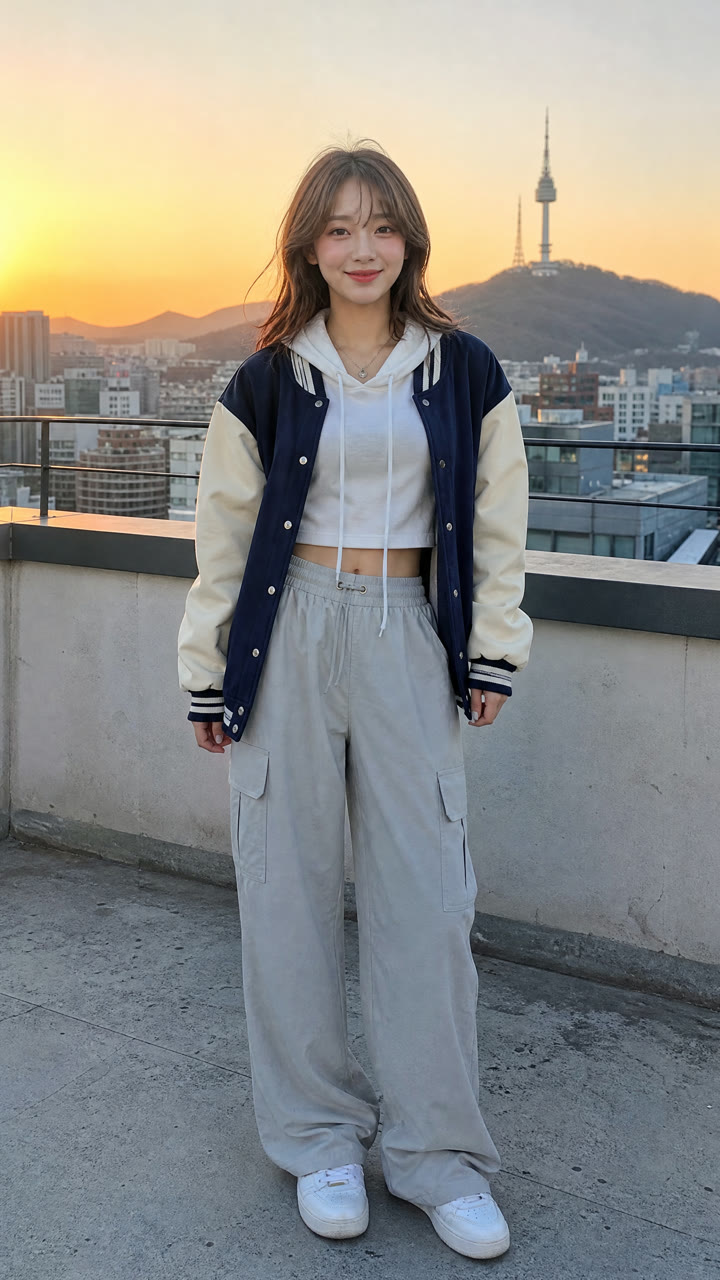
Notice the visible face, outfit and space around the body. Use a photo you have permission to animate.
Prepare the image. Prefer one visible face, even lighting and enough room for the planned movement. A wider portrait is often easier to work with than a close-up selfie.
Choose the movement. Use a matching preset, or supply a permitted reference if the tool supports it. Confirm the inputs rather than assuming every upload box accepts a video.
Test and inspect. Start with a short draft. Check the face, hands, feet and crop before spending more on an extended result.
What if I only have a close-up selfie?
You can take a wider photo, use a workflow that explicitly accepts a face photo, or prepare a wider image in an editor. Outpainting invents missing visual information; it cannot recover your real unseen clothes or body. Review the edited image before animating it.
Check the crop before you start: leave space above the head and beside both arms.
Can AI copy the same dance and keep my face, outfit and background?
A motion reference can guide movement more directly than text alone, but it does not guarantee identical choreography or perfect preservation of appearance. Face identity, clothing, body shape and background stability are separate things to inspect.
Compare frames before, during and after a turn. Look for face changes, merged hands, moving clothing details and a background that bends with the dancer. If your outfit or room is essential, confirm that the chosen workflow uses the starting image rather than replacing only a face in other footage.
How should I frame the dancer and neon scene?
The reference site presents Firestarter as a K/DA-inspired dance concept. Its samples use strong colored light and bright contours around a single performer. Treat that as a visual reference, not a guarantee about a model or an official affiliation.
Build a starting image where the person is readable without particles. Place the subject away from the edges and keep a clear floor if the feet are visible. Use a darker background behind pale clothing, or lighter accents around a dark outfit, while leaving the face recognizable.
Start with a fixed camera. Combining a rotating camera, a body turn and moving lights in the first draft makes it difficult to isolate the cause of a distorted frame.
Try an original Firestarter motion prompt
Adapt this draft to your chosen tool. It describes a short stylized performance rather than promising exact choreography. If the tool accepts a permitted motion reference, use that for the sequence and keep text instructions focused on identity and composition.
One dancer centered in a vertical frame, with space above the head and beside the arms. Preserve the face, hairstyle and outfit from the starting image. Begin in a confident relaxed pose, shift weight to one side, add one crisp arm accent, then return to a balanced stance. Fixed front-facing camera, continuous shot. A dark stage with restrained purple background light and a warm rim light around the subject. Keep the face naturally readable, the hands separate from the torso and the visible feet grounded. No cuts, extra people or sudden wardrobe changes.
For a simpler test: remove the arm accent and keep only the weight shift. For a character: explicitly ask to preserve the existing illustration style and proportions. Add a small direction change only after the first motion stays stable.
Keep each revision focused. If the hands deform, simplify the gesture before adding more lighting instructions. If the face changes, reduce the turn before changing the whole scene.
How do I check the first dance draft?
Watch once at normal speed, then pause during the largest gesture and any turn. Compare the face and outfit with the source image. A dramatic glow can hide errors that become obvious in a paused frame.
- FaceRecognizable at the start, through a turn and at the end.
- HandsSeparate from the face, clothing and the other arm.
- Feet and cropGrounded movement with the important gesture inside the frame.
- Saved fileCorrect opening, ending, frame shape and intended audio.
| Problem | Next test |
|---|---|
| Bright effects erase facial detail | Reduce glow near the face and keep the rim light behind the subject. |
| Hands merge into clothing | Use a simpler arm movement with a clearer gap from the torso. |
| The outfit changes mid-shot | Shorten the draft and reduce simultaneous motion. |
| Feet slide or float | Use a smaller weight shift and a visible, stable floor. |
| The subject moves outside the crop | Widen the starting composition before animating. |
| The routine differs from the reference | Check for motion-reference support instead of repeating only the dance name. |
These are starting points for troubleshooting, not guaranteed fixes. Keep one usable draft as a baseline so you can tell whether a revision improves the result.
Can I make a Firestarter AI dance video on my phone?
You can prepare a photo and review references in a phone browser. Actual generation and saving depend on the tool you choose; check its current mobile support before buying.
- Select a permitted photo from your device and inspect its crop.
- Open the supported template or reference workflow and check the settings.
- Keep the task link or account history so you can return to the result.
- Use the tool’s download action and locate the file in your browser downloads or Files app. Saving to Photos may require a separate share action.
Do not assume every web tool can save directly to the camera roll or share automatically to TikTok. For trial costs and export restrictions, see what to check before using an AI trial.
What should I check about music and the exported file?
Do not assume a reference soundtrack is included with a generation plan. Use audio you have permission to publish, and check the options available for your account on the destination platform. Inspect the motion without sound first, then adjust timing against your chosen track.
Open the exported file and check the first and last frames, face detail, visible hands and feet, and whether the final crop matches your intended post. Apply the platform’s current AI-content labeling options where required. A successful preview is not proof that the downloaded file has the same framing or audio.
Firestarter AI dance video FAQ
What is the easiest way to make a Firestarter dance video?
A ready-made template can reduce setup if its full sample matches your goal. If the movement must match a particular clip, check for motion-reference support. Neither route guarantees a fixed completion time.
Can I use an ordinary selfie?
A clear selfie can provide face detail. For a dance that shows arms, clothing or legs, use a wider portrait and check the photo requirements for the selected workflow.
Can a prompt reproduce the exact dance?
A prompt describes actions but does not guarantee exact choreography. Use a compatible motion-reference workflow when precise movement is important, and still inspect the result.
Will it preserve my clothes and background perfectly?
Compare the generated face, outfit and background with your original photo. Pay particular attention to turns, overlapping hands and changes in lighting.
Does a phone preview mean a downloadable MP4 is included?
No. Browser playback, generation and downloading are separate capabilities. Check export conditions before paying.
How can I make the Firestarter dance look smoother?
Start with a clear single-person reference and keep the camera movement simple. Review the hands, face and feet through the whole clip, then adjust one setting at a time so you can compare results.
Ready to choose your photo?
Choose a portrait on the Firestarter page, or compare the references again. Keep one clear goal for your first version.
Generate video →View pricing and credit plans.