
HALLOWEEN COSTUME · WHAT IS
What Is the Halloween Costume AI Trend?
Understand the costume reveal, compare still images with moving transitions, and prepare a photo for the look you want.
By Burning Bridges AI Video · Updated
What is the Halloween Costume AI trend?
It is an outfit-reveal video: an everyday look changes into a witch costume during a gesture or spin. Compare the starting outfit, the transition and the final pose; a costume still shows only one of those stages.
A costume image designs the look. A filmed match cut joins two outfits. An AI video animates the change. Choose the result you mean before comparing the examples.
What is the Halloween Costume AI video idea?
Short answer: The Halloween Costume AI reference is an outfit-reveal scene: an everyday look changes into a witch costume during a gesture or spin. The effect depends on the same person remaining recognizable before and after the change.
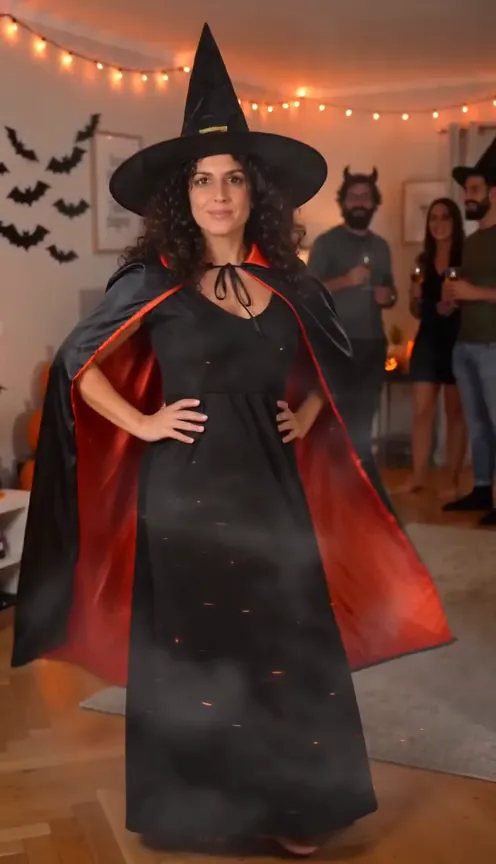
The clothing transition is the main event. A clear starting outfit gives the reveal something to contrast with, and the final pose lets the viewer inspect the costume. Sparks or a whirl can hide the cut, but too much visual clutter can hide the face as well.
Read the scene, one moment at a time
Show the everyday outfit
Begin with a readable pose and enough body framing to establish the clothing. If the opening is too brief, the transformation has little contrast.
Choose the transition beat
Use a small turn or hand movement as the moment of change. Keep the gesture simple enough that the face can be followed.
Hold the costume
End on a clear pose with the hat, sleeves and lower outfit visible. The final frame should not be hidden behind sparks or motion blur.
What should you distinguish before choosing a tool?
A costume still, an edited change of clothes and a generated transformation are different outputs. A still-image dress-up tool may help design the final look without creating the motion between outfits. Likewise, changing a portrait locally does not transform the clothes.
Compare a full moving example with the result you actually want. A thumbnail can show clothing and background, but it cannot establish timing, identity stability or what happens when people and objects overlap.
Which photos and roles matter?
Choose a front-facing photo with the full everyday outfit visible where possible. Keep hands away from the face and leave room above the head for a hat or other costume detail. Avoid starting with a heavy filter that obscures the original appearance.
You can inspect the photos in the local Halloween Costume planner. The preview displays the files you choose; it does not predict a model’s output.
How do you turn the idea into a video?
Create a convincing before-and-after pair before animating the change. Check that the same person, body proportions and camera angle appear in both. A transition model may support a start and end image; verify that input format rather than assuming two uploaded images are interpreted as endpoints.
The Halloween Costume creation guide walks through the inputs and the checks to make before accepting a draft. For a route without paid renders, compare Halloween Costume free options.
What makes a result worth keeping?
Use a match cut if you have access to the costume. Use image generation for costume design only if you understand it may stop at a still image. For a full animated reveal, inspect identity consistency and the final outfit before evaluating sparkle effects.
Review the exported file, not just the first frame or a loading preview. Watch once without sound to judge the visual sequence, then with your chosen audio to assess the timing. A reference soundtrack does not establish what another tool includes.
References and scope
Reviewed October 22, 2026. Visual observations describe the references collected on our Halloween Costume page, rather than every version posted elsewhere. This guide does not claim an original upload date, a popularity ranking or a tested external render.
Frequently asked questions
Does the reference audio come with every result?
No such promise is made here. Check the selected tool’s audio and export terms, and use audio permitted for your intended post.