
BURNING BRIDGES · TREND VIDEO GUIDE
How to Make an I Feel Like Nicole AI Video
Prepare one clear portrait and keep the cooler-cam action in order: door opening, performance, turn, can and exit. Use the short route below before adjusting the detailed prompt.
By Burning Bridges AI Video · Updated
How do I start the cooler-cam sequence?
Choose one performer with a clear face and visible outfit. Leave room for the hands, door opening and aisle turn.
Prepare your performer photo → · Follow the four steps →
Looking for a full-body solo or duo dance in a red room, living room or subway?
Go to Nicole Kidman Dance →
Four steps to get started
- Confirm the cooler-cam reference. Watch the door opening, aisle turn and pink-can action. Choose one continuous sequence with one performer. Watch the scene references.
- Prepare one portrait. Keep the face and outfit visible, with space for hands and the full-body exit. Use the single performer slot on the scene page. Open the photo area.
- Keep the viewpoint and review the details. Treat the camera as fixed inside the drinks cabinet. Review the selected scene, required input, output and credit details before continuing. Review current plans.
- Inspect the door, can and exit. Check the face throughout the change in distance, then the hand-to-can contact and door closing. Watch the saved video and check the audio before sharing. Check download terms.
Watch the face as the performer changes distance. Keep the hand, pink can and door distinct, and check that the exit follows the aisle.
Choose the right I Feel Like Nicole AI Video workflow
First decide whether you want a reference picture, a fixed cooler-cam sequence or an original scene. A page with an I Feel Like Nicole label may offer only a still image. Look for a playable example and confirm that the selected mode exports video.
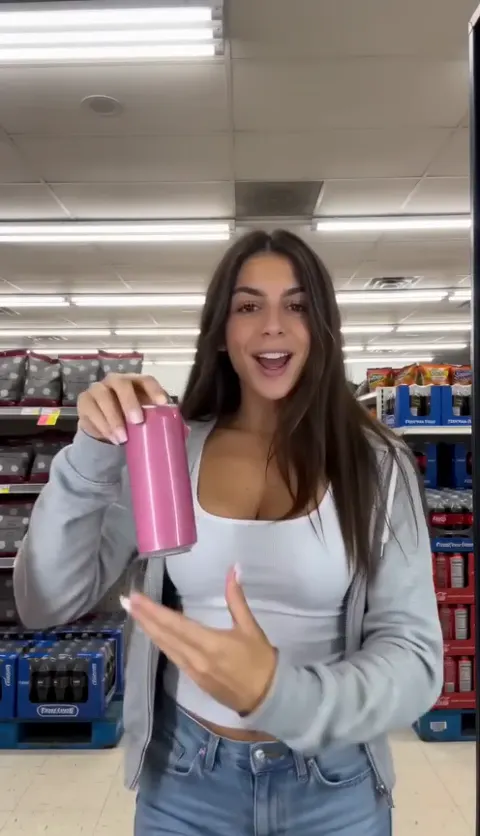
A template for the cooler-cam routine
Use a dedicated template when its preview already shows the portrait and movement you want. Check whether the scene is fixed or selectable. Do not assume a cooler-cam performer template can produce a different aisle, extra people or a different prop just because you can upload a different photo.
A prompt for your own variation
Use an image-to-video mode that accepts text when you want to explore a different exit. The prompt below describes an original cooler-cam performer sequence. It is a starting idea, not a tested preset or a promise to reproduce the reference.
Prepare a photo that gives the cooler-cam sequence room
Choose one person facing the camera in even light, with their face unobstructed. For a full-body cooler scene, leave space above the head, around the hands and below the shoes. That makes it easier to judge whether the final face, hands and pose fit the frame.
A blurry face or cropped hands already leave missing information in the source. Start with a cleaner photo instead of relying on a longer prompt to repair it.
You can use our local photo preview to inspect a JPG, PNG or WebP up to 10 MB. Selecting it here does not upload it. Your chosen generator has separate file requirements; check those before submitting. See the photo guide for more framing checks.
How to make an I Feel Like Nicole AI video in five steps
Choose one door sequence and one final frame
Write down the starting portrait, the door opening and lip-sync cue and the door-close ending. For example: door opening, lip-sync, aisle turn, pink can and exit. Use one performer and one continuous routine for the first draft.
Open a compatible mode and add your photo
In a template tool, open the effect whose preview matches your plan and follow its input labels. In a prompt-based tool, select image-to-video and supply the photo as the visual input. Use your own photo or an image you have permission to use.
Check the frame, output and price
Choose portrait framing if you want a phone-shaped clip; the examples on our page are vertical. Review the selected duration, resolution, credit charge and download conditions in that tool. These settings and costs differ by service, so a reference clip cannot establish what your purchase includes.
Generate one draft
If the tool accepts text, describe the gesture, cooler-cam action order and ending pose. For a fixed template, use its prescribed controls. Submit only after checking the selected settings, then wait for that task to finish before starting duplicate attempts.
Review before trying again
Watch at normal speed, then pause at the sequence. Check the face, fingers, pink can and feet. Save a note about the biggest problem and change one input or instruction for the next draft. Keep a retry budget; a visually disappointing result may still be a completed, charged generation.
An I Feel Like Nicole AI video prompt to adapt
Keep the prompt focused on the visible actions and their order. The original prompt below follows that approach. Paste it only into a tool that accepts image-plus-text video instructions, and adjust it to the mode you selected.
A steady vertical shot from inside a drinks cooler. The person in the input photo opens the glass door, looks into the camera and lip-syncs with playful confidence. They step backward, turn through the aisle, reach for a pink drink can, close the cooler door and leave frame. Keep the face recognizable through the turn and body proportions stable. The hand grips the can naturally without distorted fingers. Keep the performer visible as they step into the aisle. One continuous vertical shot with natural cooler lighting.
Treat the wording as a request, not a guarantee of identity or motion. If the sequence is too busy, try a smaller gesture and a simpler cooler action. Add extra scenery only after the subject and cooler-cam sequence read clearly.
What to change when the cooler-cam sequence looks wrong
These are practical troubleshooting options, not guaranteed fixes. Compare the same moment in each draft so you can tell whether a change helped.
- The face changes during the spin
- Try a sharper, front-facing source and a smaller turn. Pause on the final face before accepting the result.
- The door, can or hands appear at the wrong time
- Make the order explicit: door opening, lip-sync, can pickup, door close and exit. If the template fixes that timing, use a different effect or accept its sequence.
- The hands or pink can merge into the body
- Inspect whether those areas are readable in the input. Try a less crowded pose and fewer simultaneous movements.
- The cooler-cam sequence is cropped
- Compare the input crop with the output frame. Leave space around the head and feet, and confirm that the selected mode supports the composition you need.
- The result is a still image
- Check the mode and exported file. A cooler-cam sequence photo editor does not become a video generator because you asked for an aisle turn in the prompt.
Check the sound and saved video before posting
Play the downloaded file outside the generator. Listen for any included sound before adding another track, and check that the cooler-cam sequence remains visible in the final crop. Leave the door close and walk-away on screen long enough for a viewer to follow the ending.
For TikTok, Reels or Shorts, inspect the post preview before publishing. Keep important details away from the interface overlays. Check the destination's current audio and AI-labeling options for your post; the soundtrack in a example does not establish what your download contains.
I Feel Like Nicole AI Video FAQ
How do I make an I Feel Like Nicole AI video from one photo?
Choose a generator that supports a cooler-cam template or image-to-video instructions. Upload one clear photo, check the output settings and price, then generate a draft. Review the face, hands, prop and timing before downloading.
Which I Feel Like Nicole AI Video maker should I choose?
Choose by the result you want: a fixed cooler-cam sequence template for its specific scene, or a prompt-based tool for an original variation. Check the actual preview, supported inputs, export options and current cost before paying.
Can I make an I Feel Like Nicole AI video for free?
Watching our examples and previewing a photo are free. Video generation on external services has its own pricing. Check whether a free offer includes a downloadable video and whether watermarks or other limits apply.
Do I need a full-body photo?
A full-body image is useful when the exit includes the full person, hands and shoes. Follow the chosen template requirements. A close-up cannot show the original full portrait, so use it only when that framing fits your intended result.
Will the AI keep my face exactly the same?
Identity consistency is not guaranteed. Inspect the face before, during and after the sequence. If the result changes noticeably, try a clearer source image or a simpler motion before spending credits on another elaborate scene.
Is this the same as an I Feel Like Nicole photo filter?
A photo filter produces a still look, while a cooler-cam sequence video needs movement and a timed movement sequence. Check that the selected mode exports video before you upload or pay.
Is this the Nicole Kidman solo or duo dance?
This page follows one performer through a cooler-door opening, aisle turn, pink-can action and exit. The Nicole Kidman Dance collection focuses on full-body solo or duo routines in other settings. See the Nicole Kidman Dance scene.
Start with one clear cooler-cam action order
A useful I Feel Like Nicole AI video plan has an identifiable person, a readable door and aisle sequence and a clear ending as the door closes and the performer walks away. Choose a compatible workflow and review one draft before spending more.